# Get Started

Crypto Trading Hub on the Etherlink blockchain.

IguanaDEX helps you TRADE your crypto and EARN more crypto.

Trade & Earn without the need to go through a Centralized Exchange or counterparty. On the app, you can exchange a token for another one at market rate or even create a pool for your token permissionlessly.

### [Trade](/iguanadex-intro/trade) <a href="#trade" id="trade"></a>

Instantly swap crypto tokens: no registration or counterparty needed.

### [Earn](/iguanadex-intro/earn) <a href="#earn" id="earn"></a>

Earn trading fees and IGN token incentives by providing liquidity.

***

All you need is an EVM wallet and some XTZ tokens on Etherlink.

#### Examples of EVM wallets:

* [MetaMask](https://metamask.io/)
* [Rabby Wallet](https://rabby.io/)
* [Coinbase Wallet](https://www.coinbase.com/wallet)


# Bridge tokens to Etherlink

The [Etherlink Bridge](https://bridge.etherlink.com) allows you to bring your tokens from any chain to Etherlink

## Video guide - walk-through of the Bridge by the folks over at Etherlink:

{% embed url="<https://www.loom.com/share/6a1bb548a5c7439fafdb328b4785adca?sid=09934f02-3997-4270-9c73-d6a4385bb699>" %}

## Written guide:

The following guide uses BNB Chain as an example. The same process can be applied to any other chain supported by the [Etherlink Bridge](https://bridge.etherlink.com). If for example you have some tokens on Ethereum or Polygon instead, you can do the exact same thing and your tokens will end up on Etherlink.

### **Bridge USDT from BNB Chain to Etherlink** <a href="#bridge-cake-from-bnb-chain-to-ethereum" id="bridge-cake-from-bnb-chain-to-ethereum"></a>

1 - Make sure that your wallet supports both BNB Chain and Etherlink. We recommend using MetaMask.

Then open the [Etherlink Bridge](https://bridge.etherlink.com).

2 - First, let’s connect your wallet to the bridge.

Click "Connect" and choose your preferred wallet.

![](https://157314209-files.gitbook.io/~/files/v0/b/gitbook-x-prod.appspot.com/o/spaces%2Fwk6NRJ09CW1kqXMpLSTm%2Fuploads%2Fgit-blob-5fd1f16eedcc40be16e6fcd1336647abe48b7d27%2FScreenshot%202024-03-23%20at%2020.05.05.png?alt=media)

Then confirm and approve in your wallet popup.

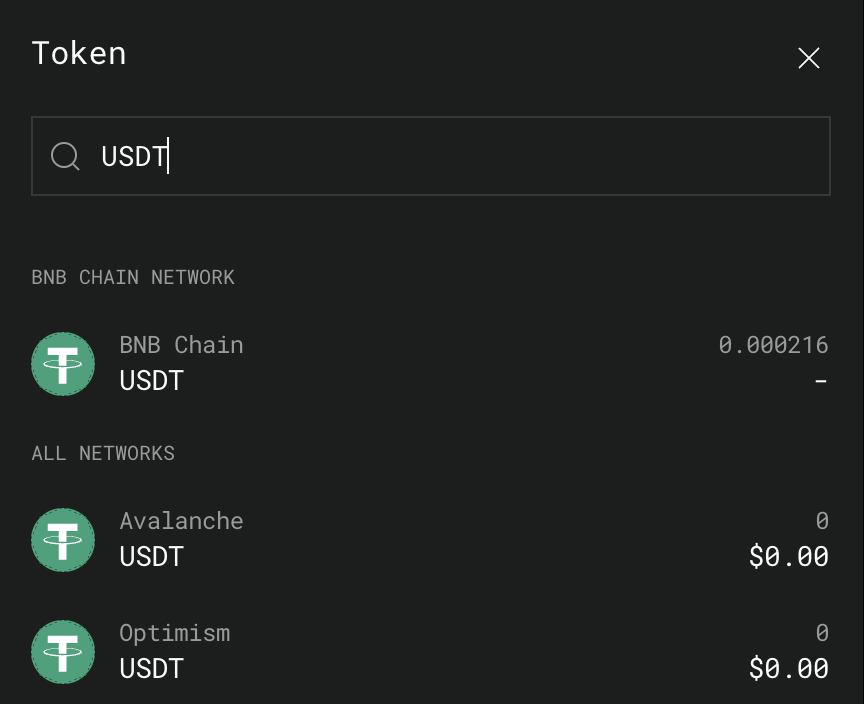
3 - Click the "v" in the upper token selection field and search for the symbol of the token you would like to bridge. In our case "USDT":

<div align="left"><figure><img src="https://157314209-files.gitbook.io/~/files/v0/b/gitbook-x-prod.appspot.com/o/spaces%2Fwk6NRJ09CW1kqXMpLSTm%2Fuploads%2Fgit-blob-48c25f5cc0737ceeab9fb8594e82d35c91afb220%2FScreenshot%202024-03-23%20at%2020.12.33.png?alt=media" alt="" width="375"><figcaption></figcaption></figure></div>

Make sure to select the right chain - in our case "BNB Chain".

4 - The “Network” you are sending those tokens to will automatically be set to Etherlink for you.

5 - Input the number of USDT you want to send from BNB Chain to Etherlink **in the upper section**.

6 - Note that the bridge will send a small amount of XTZ tokens to your address on Etherlink if you do not already have some in your wallet. This is useful because you will need some XTZ tokens in order to submit transactions on Etherlink.

![](https://157314209-files.gitbook.io/~/files/v0/b/gitbook-x-prod.appspot.com/o/spaces%2Fwk6NRJ09CW1kqXMpLSTm%2Fuploads%2Fgit-blob-410d70627c19030ebedf5bd436a4978c460c5569%2FScreenshot%202024-08-23%20at%2015.54.45%20\(1\).png?alt=media)

7 - Click "Transfer" to initiate the bridging transaction and confirm via the wallet confirmation pop-up.

Please note that you must approve two transactions when you try to bridge for the first time. The first transaction is to approve USDT.

8 - Sit back and relax. The operation should only take a minute or so. Once the bridging is complete, USDT will be deposited to your Etherlink address. You can monitor the progress of the operation by looking at the progress bar.


# Trade

Swapping/Trading - IguanaDEX lets users trade without the need to go through a Centralized Exchange or counterparty.


# Earn

### Liquidity Pools <a href="#liquidity-pools" id="liquidity-pools"></a>

You can only swap tokens on IguanaDEX if there is enough liquidity for those tokens. If nobody has added much liquidity for the token or tokens you want to swap, it will be difficult, expensive, or impossible to do so.

Providing liquidity will get you LP Tokens, which will earn you rewards in the form of trading fees for making sure there's always liquidity for the exchange to use.

### Liquidity Provision fees vs Impermanent loss <a href="#yield-farming" id="yield-farming"></a>

Liquidity providers net P\&L on the LP operation mainly depends on 2 things:

* The fees received by liquidity providers - which are paid by the traders
* The risk of [impermanent loss](https://academy.binance.com/en/articles/impermanent-loss-explained) should the liquidity provider remove liquidity at a price that is significantly different from the price level that prevailed when they added liquidity


# Security Audits

IguanaDEX is a 'perfect' fork of PancakeSwap. See Security Audits from PancakeSwap directly.

### PancakeSwap history

The smart contracts powering IguanaDEX were created by the PancakeSwap team, mainly replicating the work of the Uniswap team for versions 2 and 3 of their flagship AMM Spot DEX.

The current PancakeSwap app contains 3 decentralized exchange versions.

* [v2](https://github.com/pancakeswap/pancake-smart-contracts): this is a perfect fork of Uniswap v2
* [v3](https://github.com/pancakeswap/pancake-v3-contracts): Uniswap v3's business license expired mid-2023 and PancakeSwap took the opportunity to upgrade their app by deploying a slightly tweaked version of the Uniswap v3 contracts
* v4: this version is not available on IguanaDEX and there are currently no plans to make this available in the future.

You can find the audits pertaining to those contracts here:

* v2: The Uniswap v2 audit itself is relevant here as PancakeSwap did not introduce any changes
  * [dapps.org](https://dapp.org.uk/reports/uniswapv2.html)
  * [SlowMist](https://github.com/slowmist/Knowledge-Base/blob/master/open-report/Smart%20Contract%20Security%20Audit%20Report%20%20-%20PancakeSwap.pdf)
* v3: Note that IguanaDEX does *not* use MasterChefV3/LmPool so Phase 2 of SlowMist's audit is not relevant here
  * [PeckShield](https://github.com/peckshield/publications/blob/master/audit_reports/PeckShield-Audit-Report-PancakeSwapV3-v1.0.pdf)
  * [SlowMist](https://github.com/slowmist/Knowledge-Base/blob/master/open-report-V2/smart-contract/SlowMist%20Audit%20Report%20-%20PancakeSwap_v3_en-us.pdf)


# Contract Addresses

### **Core**

<table><thead><tr><th width="283">Contract</th><th>Address</th></tr></thead><tbody><tr><td>PancakeV3Factory</td><td>0x093cCBAEcb0E0006c8BfFca92E9929d117fEC583</td></tr><tr><td>PancakeV3PoolDeployer</td><td>0xF4c7C130cd07737DE5C619a366E719646663ACf4</td></tr></tbody></table>

### **Periphery**

<table><thead><tr><th width="282">Contract</th><th>Address</th></tr></thead><tbody><tr><td>SwapRouter (v3)</td><td>0xE67B7D039b78DE25367EF5E69596075Bbd852BA9</td></tr><tr><td>V3Migrator</td><td>0x459a7DD845E6B9Abe572Df8cE1Bfc6525B9286e8</td></tr><tr><td>NonfungiblePositionManager</td><td>0x34f957BCD46A9B0f8fCCdcc945004cE03ac6bDb5</td></tr><tr><td>QuoterV2</td><td>0xaB26D8163eaF3Ac0c359E196D28837B496d40634</td></tr><tr><td>TickLens</td><td>0x0D943E4AC4294627B04691c1139aa2854ded2Fe6</td></tr><tr><td>PancakeInterfaceMulticall</td><td>0x6CdcF8a59E044D48Ac9F5D06b1e28c17b29B0241</td></tr><tr><td>PancakeInterfaceMulticallV2</td><td><a href="https://explorer.etherlink.com/address/0xb0c3Da6fcBD970fF45cE9Ced5972486ef779C03d?tab=contract">0xb0c3Da6fcBD970fF45cE9Ced5972486ef779C03d</a></td></tr></tbody></table>

### **Routing**

<table><thead><tr><th width="279">Contract</th><th>Address</th></tr></thead><tbody><tr><td>MixedRouteQuoterV1</td><td>0x9AEb34Cb2b038b1F1df0E9079f3d223eEdc073E6</td></tr><tr><td>TokenValidator</td><td>0xB211806Db24B51C632DeF661d89DeF5a6BAF7A58</td></tr><tr><td>SmartRouter</td><td>0xbfe9C246A5EdB4F021C8910155EC93e7CfDaB7a0<br>0xe394b05d9476280621398733783d0edb7cfebdc0</td></tr></tbody></table>

### V2 Contracts

<table><thead><tr><th width="278">Contract</th><th>Address</th></tr></thead><tbody><tr><td>PancakeFactory</td><td>0x3eebf549D2d8839E387B63796327eE2C8f64A0C4</td></tr><tr><td>PancakeRouter</td><td>0xC00c41492e243ec24Bf0B3038b74d7Bd48411e63</td></tr></tbody></table>

### Stable Swap

<table><thead><tr><th width="280.68359375">Contract</th><th>Address</th></tr></thead><tbody><tr><td>pancakeStableSwapLPFactory</td><td>0xDce38A4E721b4F1096f7542260603d5B0A3756A1</td></tr><tr><td>pancakeStableSwapTwoPoolDeployer</td><td>0x236e3B58b174440322efaaBDb6d9b4b449D029Cb</td></tr><tr><td>pancakeStableSwapThreePoolDeployer</td><td>0x57Ef302d4f20d47227DDe08Ac56A18541bB01560</td></tr><tr><td>pancakeStableSwapTwoPoolInfo</td><td>0x2Cf3967DA565E7C83676d326bE1f316CE7077507</td></tr><tr><td>pancakeStableSwapFactory</td><td>0x8676553F78fE2bC2321d4e87E7B825Bb092ED7c8</td></tr></tbody></table>


# Token Addresses

<table><thead><tr><th width="165">Token Name</th><th width="136">Token Symbol</th><th>Etherlink Testnet Address</th></tr></thead><tbody><tr><td>Wrapped XTZ</td><td>WXTZ</td><td><a href="https://explorer.etherlink.com/address/0xc9B53AB2679f573e480d01e0f49e2B5CFB7a3EAb">0xc9B53AB2679f573e480d01e0f49e2B5CFB7a3EAb</a></td></tr><tr><td>Iguana Token</td><td>IGN</td><td><a href="https://explorer.etherlink.com/address/0x17F9805664347022b59a8F67C1b8237b0AC5E89B">0x17F9805664347022b59a8F67C1b8237b0AC5E89B</a></td></tr><tr><td>Tether USD</td><td>USDT</td><td><a href="https://explorer.etherlink.com/address/0x2C03058C8AFC06713be23e58D2febC8337dbfE6A">0x2C03058C8AFC06713be23e58D2febC8337dbfE6A</a></td></tr><tr><td>USD Coin</td><td>USDC</td><td><a href="https://explorer.etherlink.com/address/0x796Ea11Fa2dD751eD01b53C372fFDB4AAa8f00F9">0x796Ea11Fa2dD751eD01b53C372fFDB4AAa8f00F9</a></td></tr><tr><td>Wrapped Ether</td><td>WETH</td><td><a href="https://explorer.etherlink.com/address/0xfc24f770F94edBca6D6f885E12d4317320BcB401">0xfc24f770F94edBca6D6f885E12d4317320BcB401</a></td></tr><tr><td>Wrapped BTC</td><td>WBTC</td><td><a href="https://explorer.etherlink.com/address/0xbFc94CD2B1E55999Cfc7347a9313e88702B83d0F">0xbFc94CD2B1E55999Cfc7347a9313e88702B83d0F</a></td></tr><tr><td>Wrapped BNB</td><td>WBNB</td><td><a href="https://explorer.etherlink.com/address/0xaA40A1cc1561c584B675cbD12F1423A32E2a0d8C">0xaA40A1cc1561c584B675cbD12F1423A32E2a0d8C</a></td></tr><tr><td>Wrapped AVAX</td><td>WAVAX</td><td><a href="https://explorer.etherlink.com/address/0xe820995cD39B6E09EAa7e4e16337184b4A61B644">0xe820995cD39B6E09EAa7e4e16337184b4A61B644</a></td></tr><tr><td>SHIBA INU</td><td>SHIB</td><td><a href="https://explorer.etherlink.com/address/0xBBD1F50A212357067318a84179892684e1Ac5181">0xBBD1F50A212357067318a84179892684e1Ac5181</a></td></tr></tbody></table>


# Contract Addresses

### **Core**

<table><thead><tr><th width="283">Contract</th><th>Address</th></tr></thead><tbody><tr><td>PancakeV3Factory</td><td>0xfaAdaeBdcc60A2FeC900285516F4882930Db8Ee8</td></tr><tr><td>PancakeV3PoolDeployer</td><td>0x4497e43Ce3CECc96F28ceBa3dd06A1954a799e59</td></tr></tbody></table>

### **Periphery**

<table><thead><tr><th width="282">Contract</th><th>Address</th></tr></thead><tbody><tr><td>SwapRouter (v3)</td><td>0x03BCdBc56308c365B4dbADD4d71D0795f3ecCe36</td></tr><tr><td>V3Migrator</td><td>0x03FE32882f0e55AbbdeF867607E78F5FA9CA6812</td></tr><tr><td>NonfungiblePositionManager</td><td>0x79b1a1445e53fe7bC9063c0d54A531D1d2f814D7</td></tr><tr><td>QuoterV2</td><td>0x6e8432F0Ed242fABfA481dd449407b0f724d8D03</td></tr><tr><td>TickLens</td><td>0x8466878CfbCA4f8099cdD3a313469c8FED86DD33</td></tr><tr><td>PancakeInterfaceMulticall</td><td>0x3f25268E1B79fa2bD1879fcC78A863D1FF898d01</td></tr><tr><td>PancakeInterfaceMulticallV2</td><td>0xa318d3b9Af779Fae6429cA689bc2241d01F4C8D0</td></tr></tbody></table>

### **Routing**

<table><thead><tr><th width="279">Contract</th><th>Address</th></tr></thead><tbody><tr><td>MixedRouteQuoterV1</td><td>0x7862280735637517A7C0CBA548427f32E557D78F</td></tr><tr><td>TokenValidator</td><td>0x4d069666bBDCEe573c437d384DbbFE6e7bBd189E</td></tr><tr><td>SmartRouter</td><td>0x8a7bBf269B95875FC1829901bb2c815029d8442e</td></tr></tbody></table>

### **Farms**

<table><thead><tr><th width="278">Contract</th><th>Address</th></tr></thead><tbody><tr><td>MasterchefV3</td><td>0x3b2ffa5a9b60B9Da804eb3aB4575311F159D4a21</td></tr></tbody></table>


# Token Addresses

<table><thead><tr><th width="165">Token Name</th><th width="136">Token Symbol</th><th>Etherlink Testnet Address</th></tr></thead><tbody><tr><td>Wrapped XTZ</td><td>WXTZ</td><td>0xB1Ea698633d57705e93b0E40c1077d46CD6A51d8</td></tr><tr><td>Iguana Token</td><td>IGN</td><td>0xBeEfb119631691a1e0D9378fA7864fC6E67A72Ad</td></tr><tr><td>Tether USD</td><td>USDT</td><td>0xf7f007dc8Cb507e25e8b7dbDa600c07FdCF9A75B</td></tr><tr><td>USD Coin</td><td>USDC</td><td>0x4C2AA252BEe766D3399850569713b55178934849</td></tr><tr><td>Wrapped ETH</td><td>WETH</td><td>0x86932ff467A7e055d679F7578A0A4F96Be287861</td></tr><tr><td></td><td></td><td></td></tr></tbody></table>


# Contact Us

The [Help section](/help) did not provide you with the answer you were looking for? You have an idea or you'd like to partner with us?

#### ➡️ Reach out to us with one of the following communication channels:

* Send us a [Direct Message on X](https://x.com/IguanaDEX) (f.k.a Twitter). Our handle is @IguanaDEX.
* Send us a clear and concise email at <info@iguanadex.com> with your Discord ID and/or X handle.


# Help

## How do I get started?

In order to use IguanaDEX, you need some $XTZ - this is the gas token for Etherlink and you need a little bit of $XTZ in order to submit any transaction to the network.

The [Etherlink Bridge](https://etherlinkbridge.com) automatically provides new users with a 0.1 XTZ airdrop whenever you bridge. So if you for example have some ETH on Ethereum or Base, you can use the [Etherlink Bridge](https://etherlinkbridge.com) website and bridge your ETH.

The ETH bridged will appear in your wallet as [WETH on Etherlink](https://explorer.etherlink.com/address/0xfc24f770F94edBca6D6f885E12d4317320BcB401).

You can then for example swap some of those WETH tokens for XTZ and make sure you don't run out of gas tokens!

## Is IguanaDEX safe to use? Has IguanaDEX been audited?

* Check out the section of the [Security Audits](/iguanadex-on-mainnet/security-audits) section.
* Full Transparency:
  * The code for the [IguanaDEX website](https://iguanadex.com) is available here, fully open source.
  * Our contracts are verified on the [Etherlink explorer](https://explorer.etherlink.com), so you know that what you see is what you get. Check them out [here](/iguanadex-on-mainnet/contract-addresses).
* Security best practices:
  * The chefs use multisig for all contracts.
  * Our contracts’ time-lock gives you peace of mind.

## My own language does not appear in the dropdown

We're always on the lookout for people who could help us translate the website in more languages. If this is something that you could help us with, you can reach out us at: <hello@iguanadex.com>

## I'd like my project's token to be part of the default token list on IguanaDEX

There are a number of apps supporting early-stage tokens on Etherlink. On IguanaDEX in particular, you would typically get started by providing liquidity in a newly created pair between your token and WXTZ. We will however always be conservative when considering the addition of new tokens to the default list as our main objective remains the safety of our users' funds.


